How to Assign Program in a Course Description
- Locate your Course: From the main dashboard, find the specific Course Description you want to work with and click its Program icon.
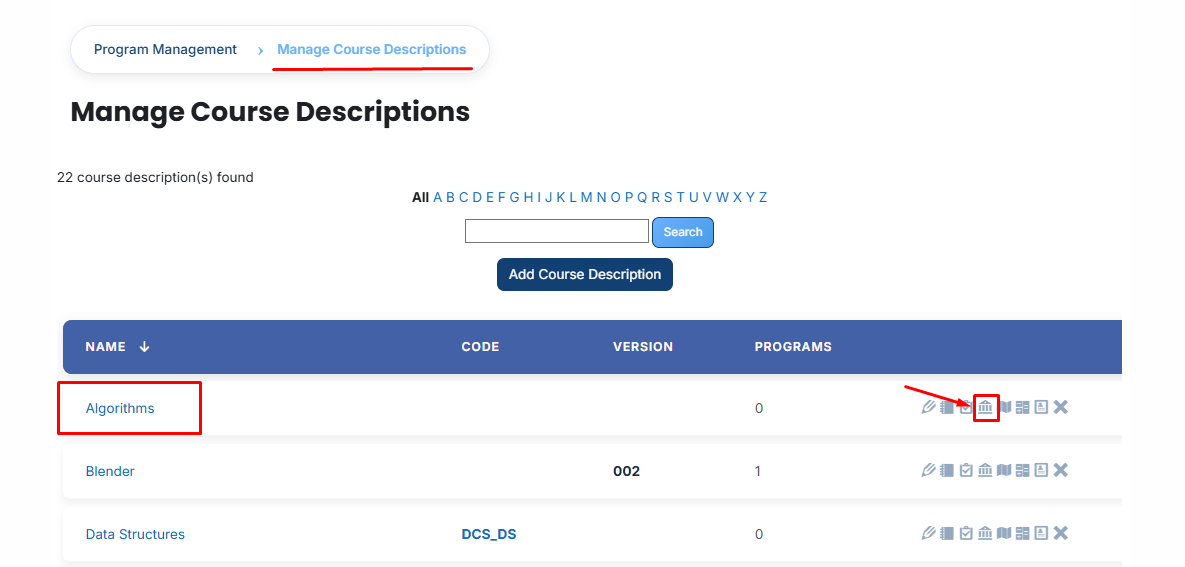
- View Assigned Programs: Once the tab opens, you will see a list of programs already linked to this course. To add a new one, click the Available to Assign button.

A list of available programs will be displayed. Select the program you want to assign.
When you click the arrow icon in the program list, the Association Data section, fill in the following details to define how the course fits into the program:
- Required or not: Click this button to set whether the course is mandatory for the program.
If it is highlighted (Yellow), it is Required, meaning the student must pass this course to finish the program.
If it is gray, it is Not Required. - Frequency: Enter a number here to set the time interval for the course.
- Time Period: Select a unit of time from the dropdown (such as Years, Months, or Weeks).
Example: If you enter 4 in Frequency and select Years in Time Period, it means the course is valid for 4 years or needs to be retaken every 4 years. - Position: Enter a number to decide where this course appears in the program's list.
Example: Entering 1 will place this course at the very top of the list for that program. - Green Tick (✔): Once you have entered all the details, click this icon to Save and Confirm the assignment. The program will then be officially linked to the course.
- Red Cross (✖): Click this icon to Cancel the process. This will close the box without saving any of the information you entered.
- After filling in all required fields, click the green tick (✔) to confirm and save the assignment.

- Next, click on the Currently Assigned button. Here, you can view all programs that have been successfully assigned to the course description .
Adding a Program if Not Available
If the required program is not listed, follow these steps:
- Name: The official title used to identify the program.
- ID Number: A unique code assigned specifically to this program.
- Long Description: A full summary providing more detail about the program.
- Required Credits: The total number of points a learner must earn to complete the program.

-
Once you save these details, the program will appear in the available list. You can then follow the steps above to link it to your course description.
Bulk User Action:
Purpose:
Use this feature to assign multiple programs efficiently.
Method 1:
- Select those programs you want to assign.
- After making your selections, click the “Add All 3 Selected Items” button to add the selected Programs.
The number displayed in the button (e.g., 3) represents the number of items currently selected and will change depending on how many items you select.

- Then click on the Assign button in the Bulk Assignment Section to move the programs to the assigned list.

Method 2:
- Click the “Add All 5 Search Results” button to add all programs with a single click. The number displayed in the button (e.g., 5) may vary depending on the number of programs available in the search results.
- If you want to remove all selected programs and reset the search criteria to their default state, click the Clear button. This will clear all current selections.
