How to Assign Users to a Batch
From the list of all batches, click the User icon for the batch to which you want to assign users.
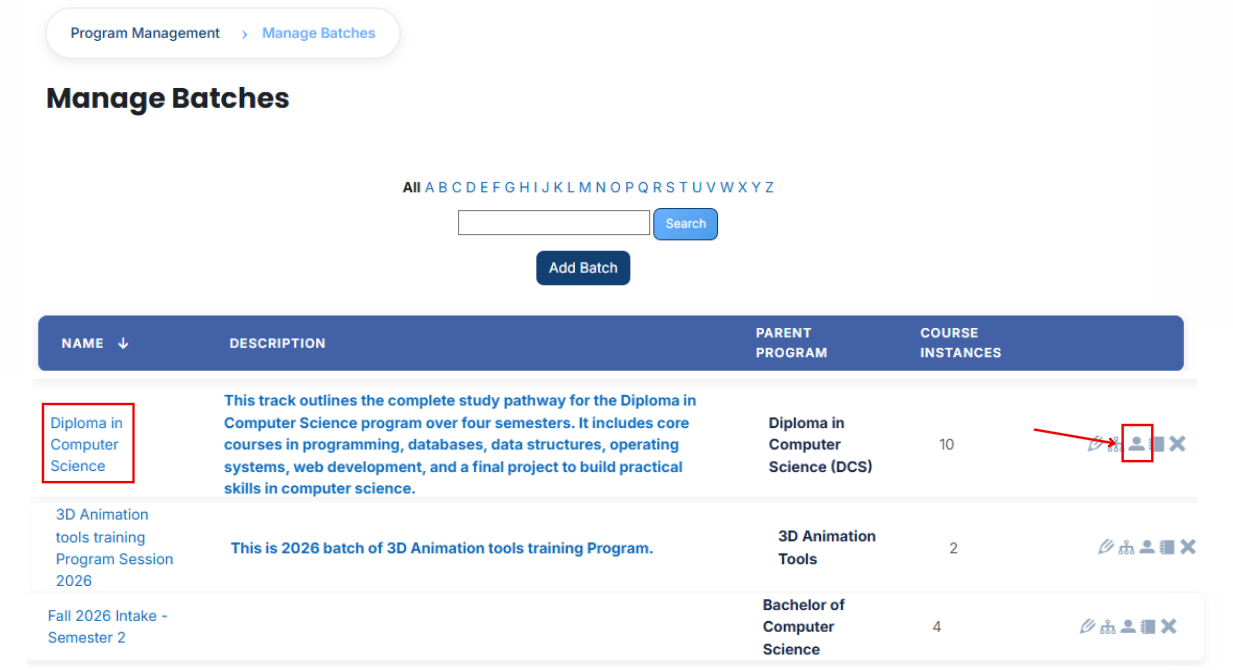
- After opening the Users tab, you will see the users currently assigned to the batch. To assign additional users, click the Available to Assign button.

- A list of available users will be displayed. Select the user you want to assign and click the arrow icon to move the user to the assignment area.
- Click the green tick (✔) to confirm the assignment.

- Next, click on the Currently Assigned button to view all users who have been successfully assigned to the batch.
Add a user if it is not available in the list
If the user you want to assign is not visible in the list, follow these steps:
- Click the Available to Assign button.
- Click the Add button.
- A dropdown list of search fields will appear.
- Select the appropriate field (such as Email, Username, City/Town, or Country).
- Enter the user's information in the selected field.

- The matching user will appear in the list. Select the user and assign them to the batch.
Bulk User Action:
Purpose:
Use this feature to assign multiple Users efficiently.
Method 1:
- Select those users you want to assign.
- After making your selections, click the “Add All 14 Selected Items” button to add the selected users.
The number displayed in the button (e.g., 14) represents the number of items currently selected and will change depending on how many items you select.

- Then click on the Assign button in the Bulk Assignment Section to move the users to the assigned list.

Method 2:
- Click the “Add All 495 Search Results” button to add all users with a single click. The number displayed in the button (e.g., 495) may vary depending on the number of users available in the search results.
- If you want to clear everything, click the Clear button.
