How to Configure the Results Engine in a Course Instance
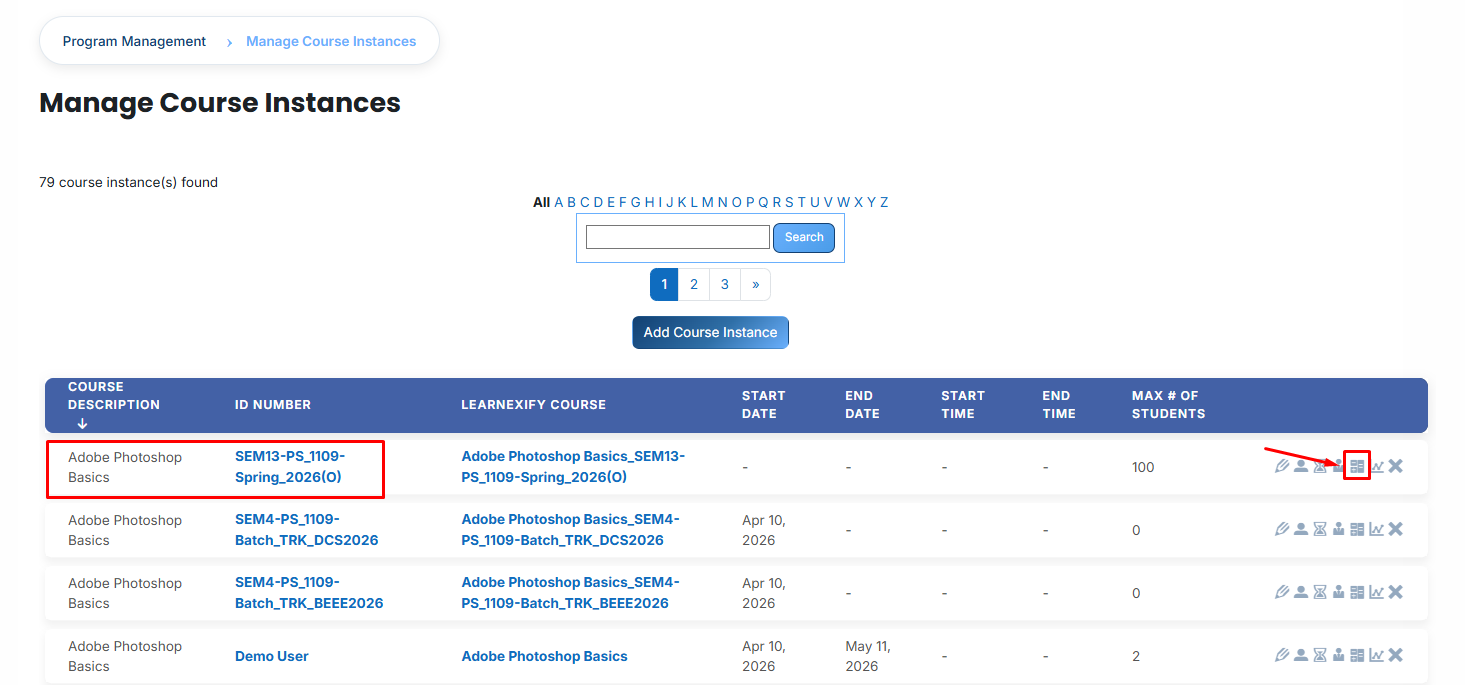
To set up automated workflows, identify your specific course instance and click on the Results Engine icon.
- Utilize the Results Engine Status Report link to review the execution history. This audit tool provides a comprehensive overview of processed course instances, including scheduled run times and actual execution dates, which is essential for administrative batching.

Activation Rule:
Toggle the Activate this results engine checkbox to enable automated monitoring. When active, the system will automatically evaluate grades based on your defined rules. If disabled, the engine remains inactive, and no automated updates will take place.
Event Trigger (Timing Rules):
Define the specific moment the system should evaluate a learner's performance:
-
- When Student Grade is Set: The automation triggers immediately upon a score being recorded.
- Use Locked Grades Only: When this sub-option is enabled, the system waits until a grade is officially finalized (locked) to prevent actions based on draft or temporary scores.
- X Days After course instance Start Date: The evaluation runs after a pre-defined number of days from the official start of the course instance.
- Manual Trigger Only: The automation remains passive and will only execute when an administrator manually initiates it via the Status Report.
Evaluation Criterion:
Select the data source for the engine to monitor—typically the course instance Grade. This informs the system which specific score value to analyze when determining results.

Automated Actions (The If/Then Logic):
For every rule, you must establish a Score Range (Minimum and Maximum). If a learner's score falls within these thresholds, the system executes the following actions:
Assign to batch:
- Automatically moves the learner into a new learning path, such as a "Promotion batch" for high achievers or a "Remediation batch" for those requiring additional support. Use the search tool to link the appropriate batch.

Assign to course instance:
- Enrolls the learner directly into a specific batch, such as a "Level 2" or a "Retake" course instance.

Update User Profile Field:
- Modifies a permanent field in the student's profile (e.g., Skill Level or Certification Status) to reflect their progress. This allows for automated competency batching across institutional reports.

Finalization:
- Click Add New Score Range to create multiple distinct rules, such as separate actions for passing and failing grades.
- Select Save Changes at the bottom of the page to finalize your settings and activate the automated course instance workflow.