# Progress Bar Configuration
The progress bar helps instructors track the overall completion percentage of the students within a class.
**Enabled:** Toggle the bar on or off.
**Completion Color Stages:** You can customize the colors to match your institution's branding:
- **0%–49% (Initial Stage):** Displays **Red** when less than half the class has finished.
- **50%–79% (Midway Stage):** Displays **Yellow** as more students reach completion.
- **80%–100% (Success Stage):** Displays **Green** as the class nears full completion.
> **Note:** You can use the **color picker** or enter a specific **Hex Code** to customize these stages.
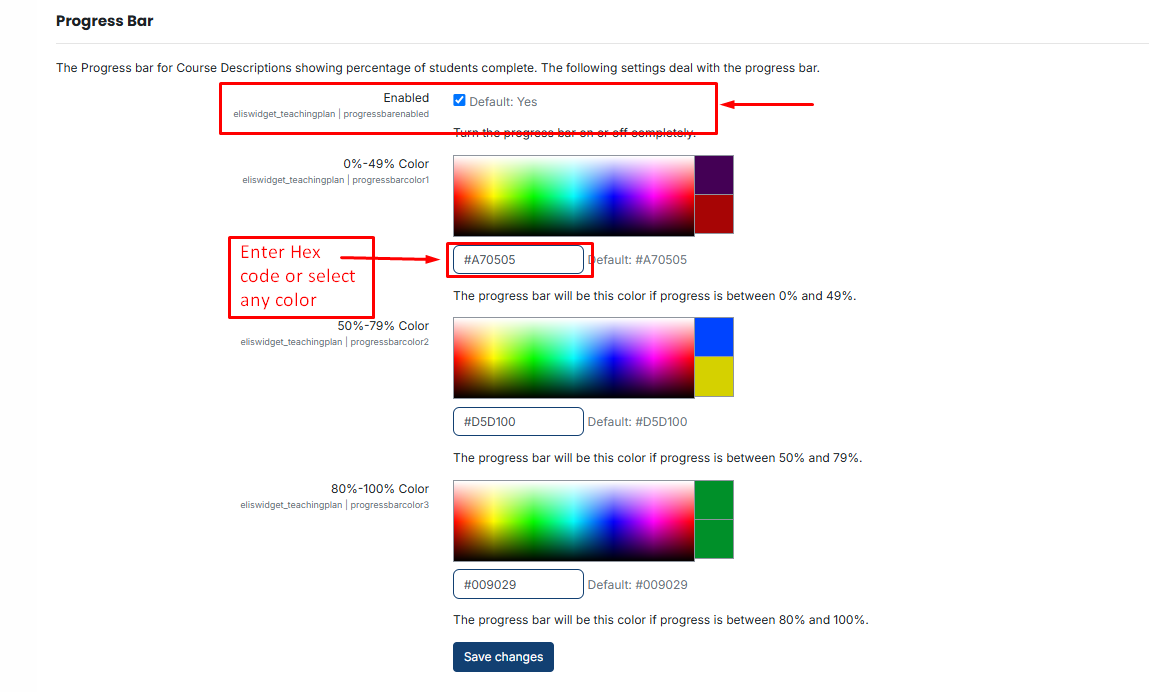
After making the necessary changes and selecting the fields, click the **Save button** to save your settings.