
Interface Features & Visual Layout
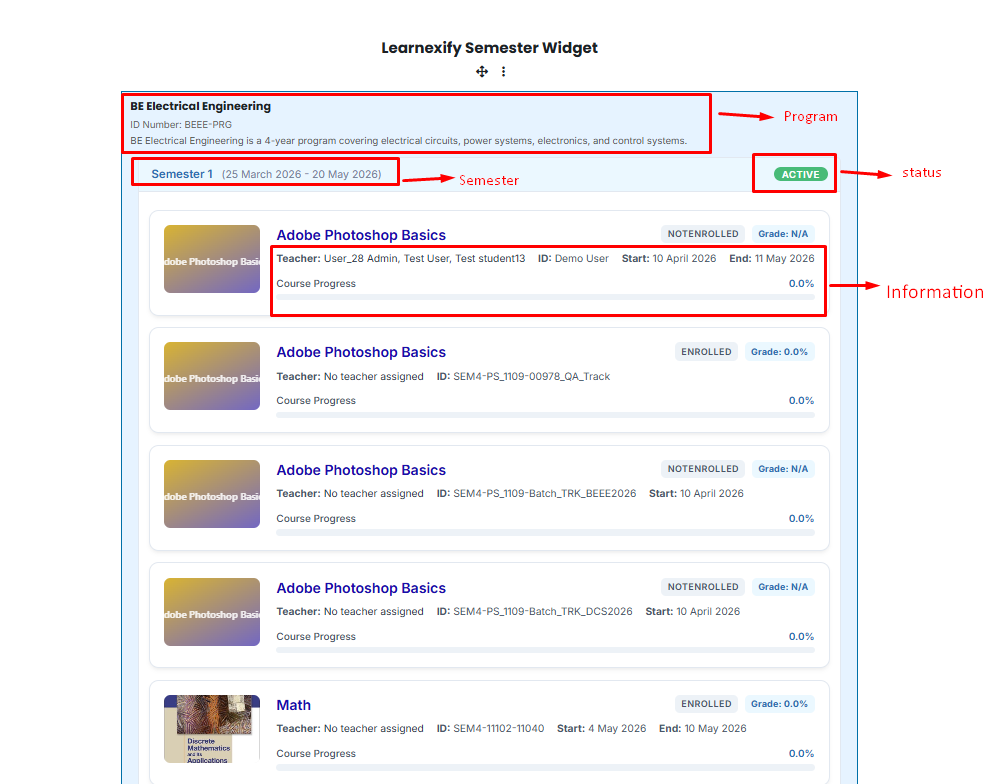
The Semester Widget is designed for high visibility and ease of use. It automatically populates data to provide a seamless experience:
Program Overview: The Program Name, ID, and Description are automatically pinned to the top of the widget for context.
Semester Status Indicators:
- 🟢 Green: Indicates a currently Active semester.
- ⚪ Grey: Indicates Inactive semesters (either upcoming or already completed).
Interactive Course Cards: Each course within a semester is displayed as a card containing:
- Assigned Teacher's name.
- Course Start and End dates.
- A real-time Progress Bar.
- Current Grade: Displayed as a percentage in the top right corner of the card.
-
Expand & Collapse: Users can click any semester header to hide or show the courses inside, keeping the dashboard clean and focused.
No comments to display
No comments to display