
Progress Bar Configuration
The progress bar helps instructors track the overall completion percentage of the students within a class.
Enabled: Toggle the bar on or off.
Completion Color Stages: You can customize the colors to match your institution's branding:
- 0%–49% (Initial Stage): Displays Red when less than half the class has finished.
- 50%–79% (Midway Stage): Displays Yellow as more students reach completion.
- 80%–100% (Success Stage): Displays Green as the class nears full completion.
Note: You can use the color picker or enter a specific Hex Code to customize these stages.
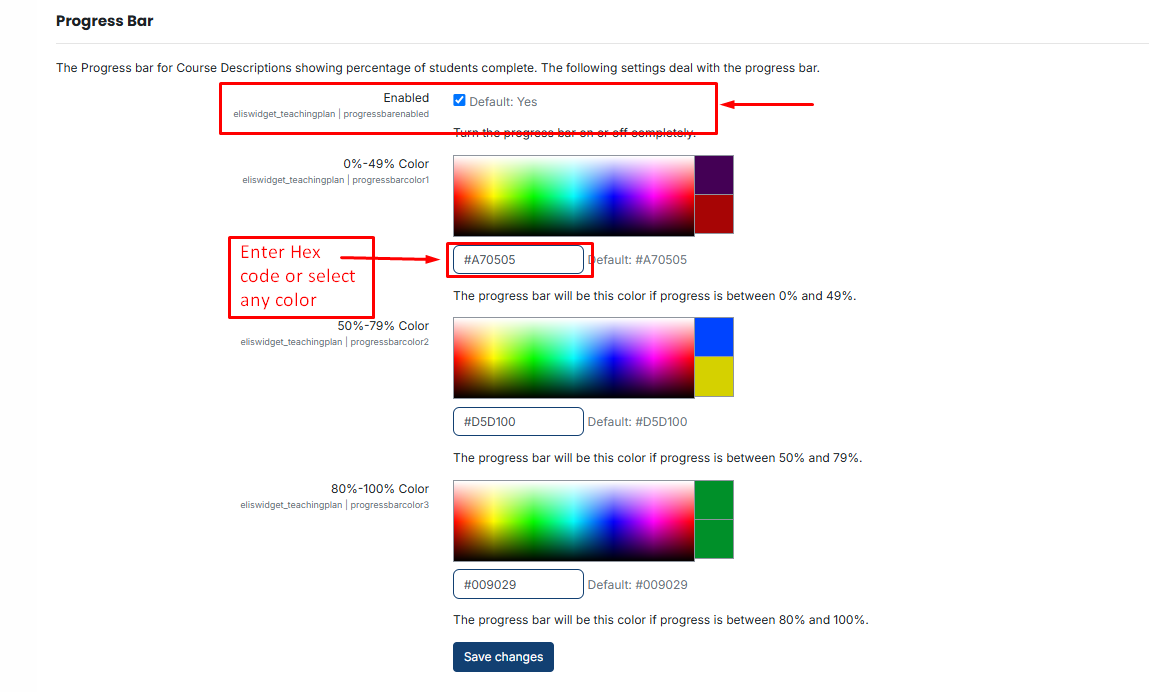
After making the necessary changes and selecting the fields, click the Save button to save your settings.
No comments to display
No comments to display